
WorldShare Interlibrary Loan release notes, March 2026
Release Date: 14 March 2026
Introduction
This release of WorldShare Interlibrary Loan, Tipasa and Resource Sharing for Groups includes significant updates to the modernized staff interface. Based on your feedback, these enhancements focus on reducing clicks, minimizing scrolling, and improving overall workflow efficiency. This release also includes fixes for known issues identified in the November 2025 release.
Key updates in this release include:
- Design improvements to request headers and details based on user feedback
- Updated pages for the preview group
- Document Delivery pages (Tipasa only)
- Print Queue enhancements with updated design and functionality
- Bug fixes addressing known interface modernization issues
These features will be available for:
- WorldShare ILL
- Tipasa
- Resource Sharing for Groups
Recommended actions
For this release, we recommend that you review the following and complete the relevant tasks so that you can follow up, adjust your policies and workflows, and train your staff. These checklists identify updates we have determined to be significant for most institutions. We encourage you to review all of the items in the release notes to determine whether there are other items that might require additional action or follow up by your institution.
Administrative actions
These items require immediate action or decisions.
| 「ACTION」 |
|---|
|
For best performance, clear your browser’s cache before starting to work with WorldShare Interlibrary Loan. |
Follow-up actions
In an effort to keep your staff informed of new features and changes, you may also want to consider these items.
|
「ACTION」 |
|---|
|
|
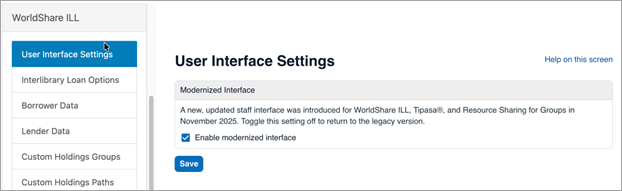
If you have reverted your interface to the legacy version in Service Configuration, please consider enabling the new, modernized, and accessible interface to review recent changes. You can do this in Service Configuration.
|
New features and enhancements
Staff interface being modernized for improved accessibility, usability, and navigation
OCLC’s Resource Sharing and User Experience Teams have been modernizing the WorldShare ILL staff interface. This modernization doesn’t introduce new functionality but improves accessibility, usability, and navigation, ensuring clearer organization of information as well as the use of modern components, elements, and behaviors.
New banner at top of ILL Homepage
A new banner will appear at the top of the ILL Homepage, providing easy access to information about modernization. The banner can be dismissed using the ‘X’ in the upper right corner.

Updated request headers and workflows
Benefits for your library staff
We've redesigned request headers based on extensive user feedback to reduce clicks and improve workflow efficiency. These updates make common actions more accessible and reduce the need to navigate through nested menus.
- Fewer clicks: Primary actions are now directly accessible from the request header
- Improved visibility: Essential options like Note and Email are exposed instead of hidden under "More actions"
- Consistent placement: Constant data has been returned to its familiar top-right position
- Streamlined responses: Actions for "Can you supply," conditional responses, and "Received?" confirmations are now directly on the header instead of in dialog boxes
What changed with this release?
New borrowing requests
November release:
- "Send now" functionality required multiple clicks
- Note and Email options were nested under "More actions"
- Constant data location was changed from the original interface

March release:
- "Send now" split button has been restored for quick submission
- Note and Email options are directly visible on the header
- Constant data is back in the top-right position where users expect it

Can you supply requests (lending)
November release:
- Responses required opening a dialog box
- Additional clicks to respond to requests

March release:
- Response options appear directly on the request header
- Streamlined workflow with fewer clicks

Conditional and Received workflows
November release:
- Responses and options were nested in dialog boxes
- Required extra navigation steps

March release:
- All responses and options are directly accessible on the header
- Simplified, more efficient workflows

Request header -- Received?
November release:
- Responses and options were nested in dialog boxes
- Required extra navigation steps

March release:
- Response options appear directly on the request header
- Streamlined workflow with fewer clicks

Request details layout
Benefits for your library
Reduced vertical scrolling: Related fields are now grouped on the same horizontal rows, significantly reducing the amount of scrolling needed to view request details. This change improves efficiency when reviewing request information and makes it easier to see all relevant details at a glance.
November release

March release

Preview group changes
Enhanced Document Delivery pages (Tipasa only)
Benefits for your library
In Tipasa, Document Delivery pages have been updated with the modernized interface design, providing a consistent experience across all areas of the system.
Key benefits:
- Consistent interface: Same modern design as other updated pages
- Improved accessibility: Enhanced screen reader compatibility and keyboard navigation
- Better usability: Updated layouts and interactions based on user feedback

Updated Print Queues
Benefits for your library
Print queues have been redesigned for the preview group based on feedback received after the November release. The updated design provides better organization and easier management of print jobs.
Key benefits:
- Improved layout: Better organization of print queue information
- Enhanced functionality: More intuitive controls for managing print jobs
- Consistent design: Matches the modernized interface aesthetic
Before March release
All print queue management is on the left-side navigation


After March release (preview group)
Print queue management moved to top of screen


What your library needs to do
These features are automatically available in the modernized interface for the preview group. No configuration changes are required.
Resolved issues
We've addressed multiple known issues identified in the November 2025 release. These fixes improve stability, functionality, and user experience across the modernized interface.
Workflow and request management improvements
Fixed issues affecting core request workflows:
- Constant data now saves reliably – Fixed issues where constant data wasn't saving correctly on borrowing requests, particularly with persistence
- Patron linking: Fixed problem where patron records were unlinking when manually applying constant data records
- Request transfers: Restored visibility of Transferred Request ID field for requests transferred from third-party systems
- Renewal workflows: Corrected the date display when requesting a second renewal to show latest approved renewal due date instead of original request due date
- Print queue display: Fixed issue where requests sent to print queue weren't appearing until the interface was refreshed
User interface and display fixes
Improved visual elements and data display:
- Tag functionality: Resolved issues with tags (Tipasa) and active request count accuracy (print queues)
- Date format helpers: Improved date format helper text to match institutional regional settings
- Partner selection: Alphabetized the partner drop-down list when changing fulfillment type to Off-system
- View Patron button: Fixed inconsistent appearance of View Patron button when patron is linked to borrowing request
- Email functionality: Corrected email field order and validation in the email notification feature
- Language translations: Fixed incorrect field name translations for "issue date" in Dutch, German, and Spanish interfaces
Field and form enhancements
Resolved limitations and functionality issues:
- Lender restrictions: Removed 30-character limit in the lender restrictions field
- Partner shipping addresses: Fixed issue where partner shipping addresses were not populating when changing fulfillment type to Off-system
- State/Province dropdowns: Corrected language display issues in State/Province dropdowns to respect UI language settings
- Article Exchange display: Fixed icon responsiveness and overlap issues when filling lending copy requests in Article Exchange while zoomed in
Performance and accessibility improvements
Enhanced overall system performance and accessibility:
- Interface responsiveness: Addressed general slowness issues in the modernized interface
- Constant data display: Fixed dropdown display to correctly show applied constant data records when requests are sent through automation
For a complete list of all known issues and their current status, visit the Known Issues page at oc.lc/modernization-issues.
What's coming next
Our target roadmap for the remainder of interface modernization for WorldShare ILL, Tipasa and Resource Sharing for Groups is reflected below. More information, including specific dates and release notes, is forthcoming.
April 2026 release
- Service Configuration updates (available to all users, no option to toggle on/off):
- Interlibrary Loan Options
- Knowledge Base Integration
- Constant Data records
- Staff interface updates (available for all users, with option to toggle between legacy and modernized interfaces):
- Document Delivery pages (Tipasa only)
- Print Queues
June 2026 release
- Staff interface (available for preview group libraries):
- Purchasing Requests
- Discover Items and Holdings Page
- Lending Priorities
- Side Menu updates
- Staff interface updates (available for all users, with option to toggle between legacy and modernized interfaces):
- Document Delivery pages (Tipasa only)
- Print Queues
- Service Configuration (available to all users, no option to toggle on/off):
- Custom Holdings Groups
- Custom Holdings Paths
- Automated Request Manager
September 2026 release
- Staff interface (available for all users, with option to toggle between legacy and modernized interfaces):
- Purchasing Requests
- Discover Items and Holdings Page
- Lending Priorities
- Left Side Menu
- Service Configuration (all users, no toggle option):
- Article Exchange Settings
- Purchase Options
- Request Forms
- Circulation Integration
- Print Settings
- Advanced Workflow
- Patron Settings
- Address Book
- 通知
- External System Settings
- WMS Acquisitions Integration
Important links
Support website(s)
Support information for this product and related products can be found at: