
NBC Import Monitor
Introduction
Between 2012 and 2015, the holdings of public libraries in the Netherlands were included in the GGC for use in Bibliotheek.nl (NBC - National Library Catalogue). Following the initial import, an import process was established to keep the holdings from the local library system up-to-date in the GGC. Only the copy information is relevant, resulting in:
- adding new copy blocks,
- the changes to data in the existing copy blocks,
- the removal of copy blocks.
To track this process, the NBC Import Monitor was developed. This document explains this monitor and its associated report files.
If you have any questions regarding this document, please contact:
- Your library system supplier for questions about the output file from your system to the GGC.
- OCLC Support Desk for questions about the GGC, WebGGC, the Import Monitor, and importing your files: support-nl@oclc.org, +31 71 524 66 00.
- KB for questions about Bibliotheek.nl.
NBC Import Monitor
The NBC Import Monitor provides a summary of the import and processing of update files from local library systems. The update files contain the copy adjustments per public library for processing in the Public Library System (GGC).
The monitor page can be accessed with the following information:
- url: https://webggc.oclc.org/htdocs/matrix.nbc/
- username: nbc
- password: <the password can be requested from the library contact person or PSO for Bibliotheek.nl>
After logging in, the following overview appears:
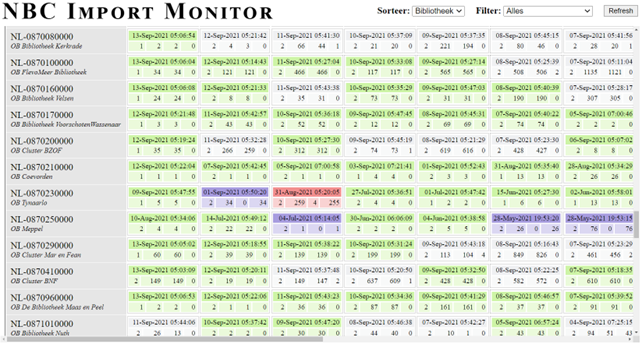
This overview reports on the import process per library or PSO.
The import process takes place daily, but if a library does not provide an import file for a day, for example because no copies have been added, modified, or removed, no block will appear in the Monitor.
The overview can be filtered in the top right corner by Public Library, Region (province), WSF Libraries, or ProBiblio libraries. Select the desired value in the top right corner and click Refresh to refresh the overview. The quickest way to find your own library is by searching with CTRL-F and the library name or ISIL code.
For each library and import date, you can see how many files were uploaded, the number of copy records offered, the number of correctly processed copy records, and the number of copy records that were not processed.
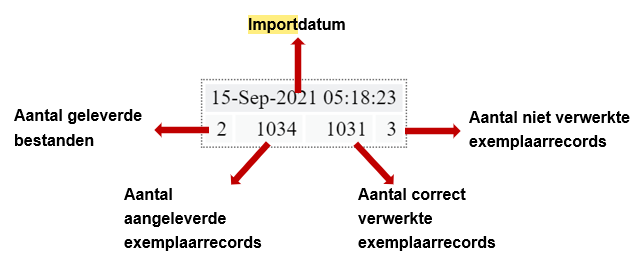
The date block changes color as the percentage of unprocessed item records increases. The colors used are green, white, red, and purple. A green date block indicates a zero percentage of unprocessed records. A white block indicates there are unprocessed records, and a red block indicates a high percentage of unprocessed records. A purple date block indicates that none of the submitted records have been processed.

By then clicking on a block, an extensive message box opens.
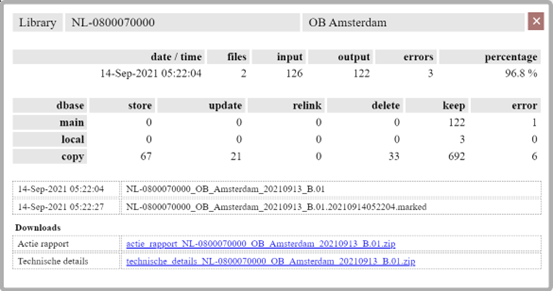
This message box contains:
- the ISIL code and library name,
- the data from the colored block in the NBC Monitor,
- an overview of the activities that have taken place,
- the file name of the provided file and of the file with marked records,
- a link to the zip file Action Report, in which the cause of the failure can be checked,
- a link to the Technical Details zip file, which contains the reports created during the import process.
The next chapter explains the action reports. The appendix explains the technical detail reports. These reports are less suitable for monitoring failures.
Action report
At the bottom of the message box is a link to download the action report. The action report contains the reporting files used to verify the import from ILS to GGC. Clicking this link will open a zip file containing the files at the bottom of the page.

This zip file contains text files that provide a readable overview of each type of error where the error occurs. If the error does not occur, no file is created.
- .err_ppnVerpl
- .GEENHITOPPPN.report
.err_ppnVerpl
This file contains an overview of the instances where the 035 field does not contain a GGC-PPN. As a result, the record cannot be found in the GGC, and an instance cannot be added. You can check the instance in the local system using the barcode. These may be locally created records without a PPN. If these records are intended for local use only, no changes are required. If these records must be available in the GGC and NBC+, a record must be entered in the GGC via WebGGC or WinIBW. The PPN can then be copied to the local system, and instance synchronization will take place.
.GEENHITOPPPN.report
This file contains a list of instances whose PPN was not found in the GGC. In these cases, check your local system to see if a correct PPN is present. If not, search the GGC or WebGGC for the correct title, copy the PPN, and add it to your local system. If no usable record exists in the GGC, add a new record to the GGC and copy this PPN to the record in your local system.
If the record is for local use only and does not need to be synchronized with the GGC, then no action is required.
Unprocessed records
Sometimes the import monitor indicates unprocessed records, even though there is no action report. This is because it is no longer actively reporting on ordered items and items to be deleted that are no longer present in the GGC. These items have already been deleted or moved to another location. Ordered items are defined as item information with a # before the barcode (in the case of Wise), the absence of the barcode, or the absence of both the barcode and placement information.
Reporting files for this outage can be found in the Technical Details. Explanations for these files are provided in the appendix.
Appendix Technical details
At the bottom of the message box, you'll find a link to download the technical details reports. Clicking this link will open a zip file at the bottom of the page containing all the files created during the import. We recommend using the files in the action report to verify the import. For completeness, this chapter explains the report files.
Clicking on the link will open the Zip file:
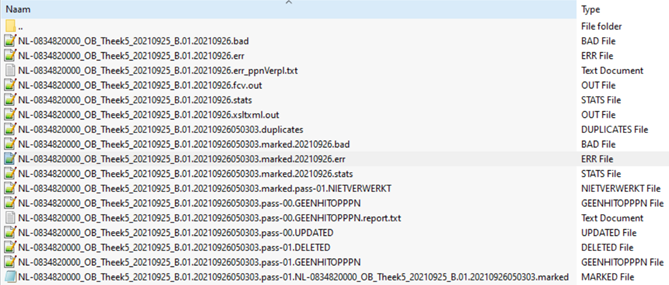
This zip file contains the files generated during the entire import process. The report files are text files that are best opened with Notepad or Notepad++.
Several checks are performed throughout the import process. The incoming file is checked during conversion to the GGC's internal format, and error messages are collected in a file. Subsequent checks are performed during the match & merge process (reading the file into the GGC). The numerous files in the Zip file are the results of these checks. The action reports are also included in this list.
Some files provide more information than others. An explanation of each file's contents is provided below. If any action is required, please refer to the detailed explanations in the following chapters.
| File name | Type | Explanation |
|---|---|---|
| ISILcode_Name_Date_B.01._Date_ | BAD file | List of record numbers that produced an error during conversion to the GGC internal format. |
| ISILcode_Name_Date_B.01._Date_ | ERR file | This file contains an overview of the processing steps in converting the supplied file in MARC 21 format to the internal GGC format Pica+. Each step indicates whether it was completed correctly or not. Step 7 lists error messages for items where essential data is missing or incorrect. One of the following error messages will be displayed:
|
| ISILcode_Name_Date_B.01._Date_ | STATS file | Statistical overview on the basis of which, among other things, the NBC Import Monitor is compiled. |
| ISILcode_Name_Date_B.01._Date_.fcv | OUT file | Result of the conversion of the supplied file to the internal GGC format (pica+) with deduplication of barcodes. |
| ISILcode_Name_Date_B.01._Date_.xsltxml | OUT file | Output file from the local system in MARC 21 format. |
| ISILcode_Name_Date_B.01._Date_Number_.duplicates | DUPLICATES file | Overview of the records that have been deduplicated by barcode in the .fcv OUT file. Sometimes multiple updates to a copy can be made in the local library system, and all these updates are included in the output file, resulting in duplicate barcodes in the local output file. During conversion, only the most recent update message is retained; other updates with the same barcode are included in this DUPLICATES file. |
| ISILcode_Name_Date_B.01._Date_Number_.marked._Date_ | BAD file | List of record numbers that returned an error during the check during the import process into the GGC. |
| ISILcode_Name_Date_B.01._Date_Number_.marked._Date_ | ERR file | Overview of copies that could not be removed with the GGC for one of the following reasons:
Explanation of these error messages can be found in the chapter: Error messages in the error file of the match&merge |
| ISILcode_Name_Date_B.01._Date_Number_.marked._Date_ | STATS file | Statistical overview on the basis of which, among other things, the NBC Import Monitor is compiled |
| ISILcode_Name_Date_B.01._Date_Number_.marked.pass-01 | UNPROCESSED file | Similar to the marked ERR file, this file also provides an overview of items that could not be removed using the GGC. It also contains an overview of incomplete items, for example, because the barcode and location code are missing. |
| ISILcode_Name_Date_B.01._Date_Number_.pass-00 | GEENHITOPPPN file | Overview of items that could not be entered or modified because the PPN was not found in the GGC during the import process. Action is required for these error messages; please check the chapter: Error messages in the nohitopppn file . |
| ISILcode_Name_Date_B.01._Date_Number_.pass-00 | UPDATED file | Overview of the results of new and modified copies. |
| ISILcode_Name_Date_B.01._Date_Number_.pass-01 | DELETED file | Overview of the results of deleting instances. |
| ISILcode_Name_Date_B.01._Date_Number_.pass-01 | GEENHITOPPPN file | Overview of copies that could not be deleted because the PPN was not found in the GGC during synchronization. Explanation of these error messages can be found in the chapter:: Error messages in the nohitopppn file . |
| ISILcode_Name_Date_B.01._Date_Number_.pass-01.ISILcode_Name_Date_B.01._Date_Number_ | MARKED file | Overview of the deleted copies |
Error messages in the conversion error file
| Example from the conversion error file | Example from the corresponding xslt file |
|---|---|
| ##TitleSequenceNumber 1081 ##TTLtype standard #CONTROLFIELD TAG 000 IS REQUIRED, BUT MISSING -001 0380481960 -005 020150428100245 -008 01504280u 0 4001Au 0150428 -035 a(NL-LeOCL)380481960 -852 a0014cKids pink 0-8 years: Know Animals AJ Dogs COOLbNL-0800970014p150428095719612BAu |
##TitleSequenceNumber 1081 -001 0380481960 -005 020150428100245 -008 01504280u 0 4001Au 0150428 -035 a(NL-LeOCL)380481960 -852 a0014cKids roze 0-8 jaar: Weten Dieren AJ Honden COOLbNL-0800970014p#150428095719612BAu Uitleg foutmelding: Het Leader ontbreekt in de aangeleverde titel. Dit is veld 000, in dit veld staat onder andere of een exemplaar nieuw (nx), updated (cx) of deleted (dx) is. Oplossing Check in het lokale systeem of gegevens ontbreken. Deze foutmelding komt nauwelijks voor. Over het algemeen wordt de leader door het lokale systeem automatisch gegenereerd. Mocht de leader ontbreken in het uitwisselingsbestand, dan kunt u contact opnemen met uw systeemleverancier. |
| ##TitleSequenceNumber 1145 ##TTLtype standard #CONTROLEVELD TAG 001 MET PPN IS VERPLICHT, MAAR ONTBREEKT -000 0 nx 22 u 4500 -008 01411240u 0 0001uu 0150501 -852 8 AGRAaGORbNL-0870510000hARIAi02p420008047309-zTIJBau |
##TitleSequenceNumber 1145 -000 0 nx 22 u 4500 -008 01411240u 0 0001uu 0150501 -852 8 AGRAaGORbNL-0870510000hARIAi02p420008047309zTIJBau Uitleg foutmelding: Het PPN ontbreekt in de aangeleverde titel. Dit is veld 001. Oplossing Check in het lokale systeem of een PPN aanwezig is. Zo niet, zoek in het GGC of WebGGC naar de juiste titel, neem het PPN over en voeg deze toe in het lokale systeem. Als in het GGC geen bruikbaar record voorkomt, voeg een nieuw record toe in het GGC en neem dit PPN over naar het record in het lokale systeem. |
Foutmeldingen in de error file van de match&merge
| Voorbeeld uit de error file van de match&merge | Voorbeeld uit het corresponderende xslt bestand |
|---|---|
| ##TitleSequenceNumber 2776 ##TTLtype standard #ILN 385 Error from CSMTCResolve in CSMTCMergeTitlesCount : MERGING ERROR: 209G/01-999+201B/01-999 absent in dbase title -001U 0utf8 -002@ 0Aap -003@/01 0327944048 -042@ 0DE -101@ a385 -201E/01 020-11-12t00.00.00.000 -201U/01 0utf8 -208@/01 a20-11-12bcB -209A/01 b3099aTHIJSfVNdix00 -209B/01 aNIJx05 -209B/01 aBNIx12 -209G/01 a690005723342 |
##TitleSequenceNumber 2776 -000 0 dx 22 u 4500 -001 0327944048 -008 01211200u 0 0001uu 0150501 -035 a(NL-LdNBD)2010261594 2011 2e dr 7.98 ga -035 a(NL-LeOCL)327944048 -852 8 ABNIaNIJbNL-0830990000hTHIJSp690005723342zVNBbu Uitleg foutmelding: Aan dit record hangt in het GGC geen enkel exemplaarblok meer van de desbetreffende bibliotheek. Derhalve kan op de aangeleverde barcode in de database geen match gevonden worden Oplossing Dit exemplaar heeft een delete code (042@ 0DE) en moet verwijderd worden. Het exemplaar blijkt in een eerdere actie al verwijderd te zijn. |
| ##TitleSequenceNumber 2869 ##TTLtype standard #ILN 385 Error from CSMTCResolve in CSMTCMergeTitlesCount : MERGING ERROR: extra 209G/01-999+201B/01-999 present in signal title -001U 0utf8 -002@ 0Aap -003@/01 0301198047-101@ a385 -042@ 0DE -201E/01 027-04-07t00.00.00.000 -201U/01 0utf8 -208@/01 a27-04-07bcB -209A/01 b3099dix00 -209B/01 aNIJx05 -209B/01 aBNIx12 -209G/01 ae0040100103c0c0a |
##TitleSequenceNumber 2869 -000 0 dx 22 u 4500 -001 0301198047 -008 00704270u 0 0001uu 0150501 -035 a(NL-LdNBD)2006441220 -035 a(NL-LeOCL)301198047 -852 8 ABNIaNIJbNL-0830990000pe0040100103c0c0aBbu Uitleg foutmelding: Aan dit record hangen één of meerdere exemplaarblokken van de desbetreffende bibliotheek, maar de opgegeven barcode komt niet voor. Voor de barcode in het aangeleverde record kan geen match geworden in het GGC. Oplossing Dit exemplaar heeft een delete code (042@ 0DE) en moet verwijderd worden. Het exemplaar blijkt in een eerdere actie al verwijderd te zijn. Gecheckt kan worden of de barcode aanwezig is in een van de andere exemplaren, bijvoorbeeld bij een andere vestiging of ander GGC-record. Zo ja, vergelijk dan de exemplaren in het lokale systeem en in het GGC of WebGGC met elkaar en zorg, indien nodig, voor een update vanuit het locale systeem. In het GGC kan de barcode gezocht worden met: z zeb [barcode] In WebGGC kan de barcode gezocht worden door zeb [barcode] in te tikken in de zoekbalk. |
Foutmeldingen in de ‘geenhitopppn’-file
| Voorbeeld uit de geenhitopppn file | Voorbeeld uit het corresponderende xslt bestand |
|---|---|
| DROP TtlSeqNr=24 ILN=460 001U $0utf8 002@ $0Aap 003@/01 $0280 042@ $0NN 201U/01 $0utf8 208@/01 $a10-02-20 $bcB 209A/01 $b7111 $aRijexamens $fVEV $du $x00 209B/01 $aHBC $x05 209B/01 $aBB $x12 209G/01 $a10000044249730 |
##TitleSequenceNumber 23 000 ¬0 cx 22 u 4500 001 ¬0280 008 ¬02002100u 0 0001uu 0201117 035 ¬a(NL-LdNBD)2019403679 035 ¬a(NL-LeOCL)280 852 8 ¬ABB¬aHBC¬bNL-0871110000 ¬hRijexamens¬i2020-p10000044249730¬sV340¬zVEV¬Bau Error message: The record contains an update to the instance, but it cannot be entered or modified because the PPN from the record was not found in the GGC during the reading process. Solution: Check the local system for a correct PPN. If not, search for the correct title in GGC or WebGGC, copy the PPN, and add it to the local system. If no usable record exists in the GGC, add a new record in the GGC and copy this PPN to the record in the local system. If the record is only intended for local use and does not need to be synchronized with the GGC, no action is required. |
| DROP TtlSeqNr=91 ILN=459 001U $0utf8 002@ $0Aap 003@/01 $0812 042@ $0DE 201E/01 $005-12-16 $t00.00.00.000 201U/01 $0utf8 208@/01 $a05-12-16 $bcB 209A/01 $b3482 $di $x00 209B/01 $aRIJ $x05 209B/01 $aTH5 $x12 209G/01 $a10000037460218 |
##TitleSequenceNumber 91 000 ¬0 dx 22 u 4500 001 ¬0812 008 ¬01612050u 0 0001uu 0201117 035 ¬a(NL-LdNBD)2016242781 035 ¬a(NL-LeOCL)812 852 8 ¬ATH5¬aRIJ¬bNL-0834820000¬p10000037460218¬Bbu Error message explanation: The record contains a delete of an instance, but it cannot be deleted because the PPN from the record was not found in the GGC during processing. Solution This instance has a delete code (042@ 0DE) and must be deleted. The instance appears to have already been deleted in a previous action, or the PPN is incorrect. Because the record contains a deleted instance that is not present in the GGC, no further action is required. |